![color-copy-1.png]](https://help.engagifii.com/hs-fs/hubfs/wp-content/uploads/2018/01/color-copy-1.png?height=40&name=color-copy-1.png)

- Requests tab added to My Area
- A new tab, 'Requests', has been added to the section titled, ‘My Area’ in the left-side menu. Clicking it as an administrator opens three links,
- Pending Requests = All outstanding Class, Award, and/or Event requests that require action
- My Requests = Includes requests raised by the logged in user only
- All Requests = Includes records of all the requests raised by all the users in the workspace categorized under different areas such as Classes, Awards, and Events.
- For each object - Class, Award and Event - multiple views have been added, such as the default list view of All Requests, Requests by Approver, Requests by Organization, etc...
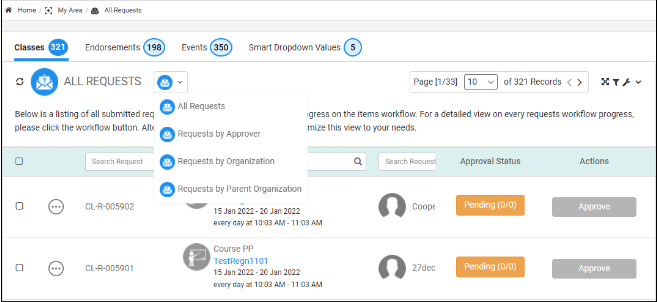
- A new tab, 'Requests', has been added to the section titled, ‘My Area’ in the left-side menu. Clicking it as an administrator opens three links,
-
- The setting which allows access to these tabs is now part of the ‘Approvals and Registrations’ section of ‘Permissions’
- Registrations tab added to My Area
- The idea is to provide a centralized place to view, modify, and/or cancel all registrations including Classes, Awards, and Events. Clicking the ‘Registration’ tab as an administrator opens two links
- All Registrations
- My Registrations
- The idea is to provide a centralized place to view, modify, and/or cancel all registrations including Classes, Awards, and Events. Clicking the ‘Registration’ tab as an administrator opens two links
-
- The following columns have been added to the Registration Details page,
- Registration Number (searchable)
- Class/Award/Event Name (searchable)
- Class/Award/Event Type
- Registrant Name (searchable)
- Registered By
- Approval Status
- Invoice
- Actions – Record Payment
- The following columns have been added to the Registration Details page,